Fast memo
Open it, start writing
The top priority is letting you enter a note the instant you open the app. Startup screens and dashboard routes are kept to a minimum, so you can write down what you are thinking with one click.
 KuroNotes

Zero knowledge memo
We can't read it.
Only your device can open it.
Fast notes.
We cut every feature that slows down note-taking. The app opens straight into a blank note, instantly. On top of that, every note and image is encrypted with a key only your device holds — nobody else can see them.
Why KuroNotes
KuroNote / KuroNotes will keep avoiding extra features that slow down note-taking. It opens quickly on both phone and PC, keeping the write, search, and recall flow nimble.
Fast memo
The top priority is letting you enter a note the instant you open the app. Startup screens and dashboard routes are kept to a minimum, so you can write down what you are thinking with one click.
No clutter
No sprawling workspaces, no complex page hierarchies, no heavy collaboration features. Everything is focused on capturing daily notes quickly.
App and web
Both the mobile KuroNote and the PC-based KuroNotes are designed to open notes quickly. Switch the save location to KuroNotes and your phone and PC stay in sync. The browser version requires a KuroNotes subscription.
Auto organize
Keywords extracted from your notes grow into automatic folders. You never have to think up a folder name or file things away yourself. Add an explicit #keyword and it's auto-classified into its own folder — a pseudo-folder whenever you want one.
Recall links
Notes that share keywords with the one you have open are automatically linked below it as related notes. Even if you can't recall the right search term, the note you're writing now leads you back to older ones.
Zero effort
This isn't a tool that only stays tidy in the hands of people good at folder design or tagging discipline. Automatic folders, most-viewed ordering (using Firefox's frecency algorithm), automatic links, and one-tap pinning all work behind the scenes, so even notes you just dash off stay findable.
How it stays private
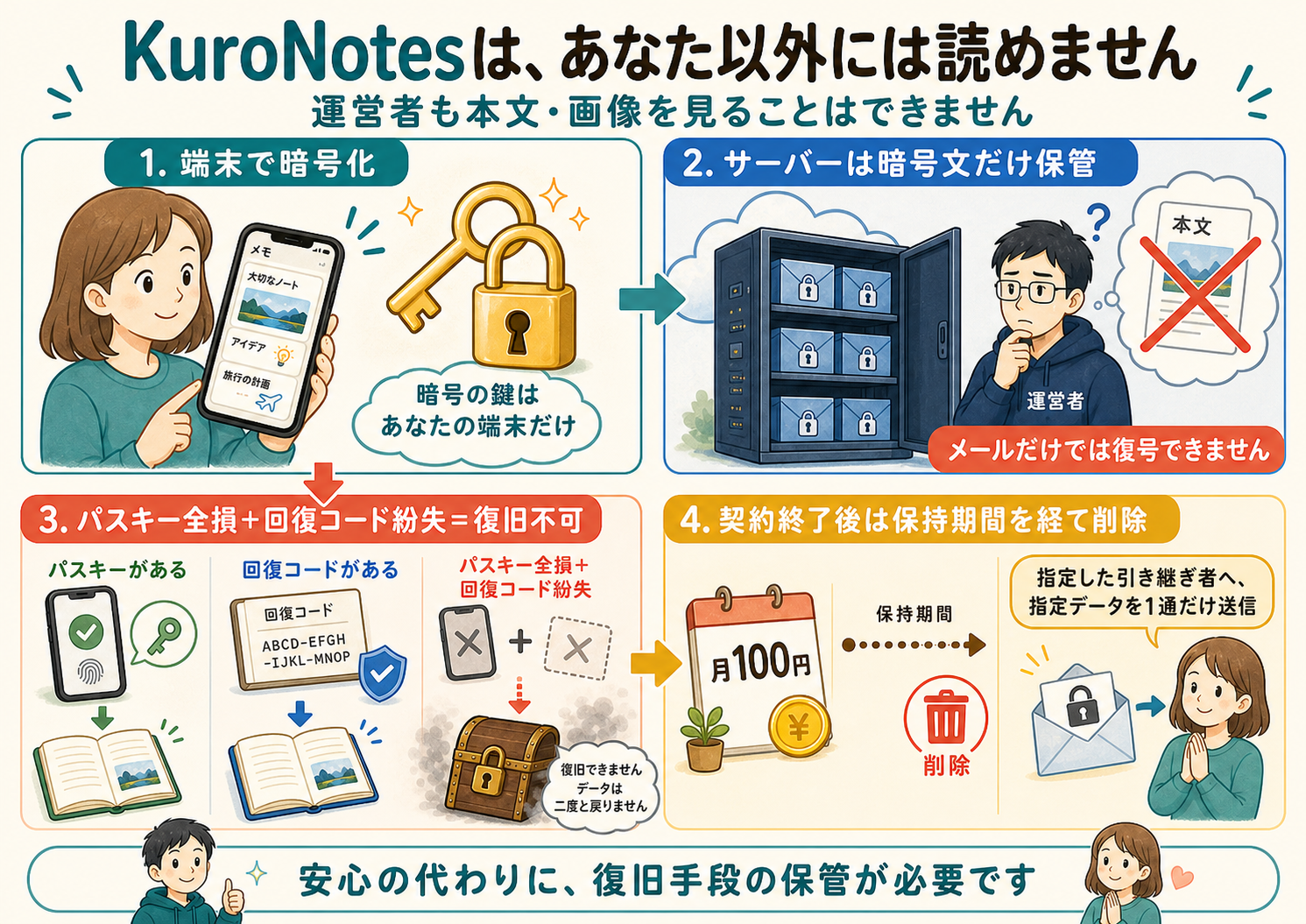
Even if the server were hacked, even if someone on our staff meant harm, your notes and images stay confidential. We call this zero-knowledge, zero-trust design. It isn't "we take privacy seriously" — it's that we never hold the information needed to decrypt anything in the first place. The trade-off: if you lose every passkey and your recovery code, not even we can get your data back.
Data on the device is stored encrypted with an encryption key. The key exists only on your device, and text and images are encrypted before they are sent. The encryption key on that device is also protected by a passkey, so there are two layers of encryption.
KuroNote cannot read the contents of your data at all, and cannot search or preview it either. Data on the phone is encrypted, and cloud storage destinations such as KuroNotes, Dropbox, Google Drive, and iCloud are also encrypted. If the save destination is not KuroNotes, encryption can be turned off.
Sync passkeys, a recovery code, or mutual approval between your existing devices — any of these carries your key forward.
Encrypted data is deleted after the retention period. The service assumes there's no getting it back — but any time before your contract ends, you can export every note and image as a backup (ZIP). KuroNotes only.

Subscription as lifecycle care
KuroNotes' monthly fee isn't only about covering server costs. It's also the mechanism that keeps encrypted data from an abandoned account from sitting on our servers forever — it gets deleted after a retention period once the contract ends.
We don't let abandoned data pile up forever
Once the contract lapses and the retention period passes, data is deleted. It can't be restored.
This isn't an inconvenience — it's intentional safety design. Whether your notes are kept or discarded is tied directly to how you manage your contract and your recovery method.
Any time before your contract ends, you can back up every note and image into a single ZIP file (PC / Web version). Open the index.html inside and you can read it straight in a browser, no app required.
Your data isn't deleted the moment your contract lapses. Resume your contract within the 60-day retention period and your encrypted data comes right back.
Once the retention period passes, data is deleted from the server and nobody can recover it — abandoned notes never sit around indefinitely.
Notes you don't want anyone to see are properly deleted even if something happens to you. Nobody has to remember to cancel — once payments stop, deletion happens automatically after the retention period.
When your contract ends, a message you prepared in advance can be sent by email (in plain text). It can be used in many ways: tell family the physical location of the family recovery code, explain that a family recovery code sent earlier only works after the contract is cancelled and include the URL, or leave a will inside your notes and tell them where to look.
Notes marked for family can be viewed with a family recovery code only during the 60-day retention period after the contract ends. It cannot be used while the contract is active, and it is only available to KuroNotes subscribers. Notes without the family mark are deleted unconditionally.
For everyday notes
Raises notes you reference often, not just notes you viewed recently. It combines last-viewed time and view count, then gradually lowers weight over time with a frecency algorithm, so the information you use stays easy to find even with a huge pile of notes.
A built-in WYSIWYG editor handles text and images directly. Images are automatically shrunk to JPEG to save space.
Export every note and image into a single ZIP file, in a format readable in any browser with no app needed — and usable to restore into a different account too. PC (Web) version only. On phones, the unencrypted iCloud / Google Drive save mode serves as your backup instead — at a higher risk of data exposure.
KuroNote / KuroNotes supports 10 languages: Japanese, English, German, French, Spanish, Italian, Korean, Chinese, Ukrainian, and Arabic.
Pricing
You can subscribe to KuroNotes from the smartphone version of KuroNote. KuroNotes is a fixed monthly subscription. If the mobile KuroNote does not use KuroNotes as its save destination, it can be used for free by saving to your own cloud storage such as Dropbox or Google Drive, but many KuroNotes-specific features such as PC browser integration, end-of-life services, and backups are not available.

© 2026 Kuro.Boo All Rights Reserved. · KuroNotes v0.2.4